General Information on Working with Orders#
Introduction#
Order - an entity representing a merchant request to exchange fiat <-> USDT.
Order directions:
PayIn- fiat -> USDTPayOut- USDT -> fiat
Order types:
P2P- transfer by card/account/phone numberQuasiEcom- card payment confirmed with a 3-D Secure/SMS codeEcom- classic card payment via internet acquiring
Order flows:
H2H- backend HTTP API integration: the service processes the order using the data from the requestPaymentPage- the merchant's client pays on the service payment page; the merchant receives the page URL
The QuasiEcom order type is a card-payment PayIn order; its direction is always
PayIn.
API for Working with Orders#
Order creation methods for each type are described on separate pages:
- PayIn - P2P - H2H
- PayIn - P2P - PaymentPage
- PayIn - QuasiEcom - H2H
- PayIn - QuasiEcom - PaymentPage
- PayIn - Ecom - PaymentPage
- PayOut - P2P - H2H
Retrieving order information is described on the "Retrieving Order Information" page.
A callback mechanism is provided for notifying merchants about final order statuses. See the "Callbacks" page.
Status Model#
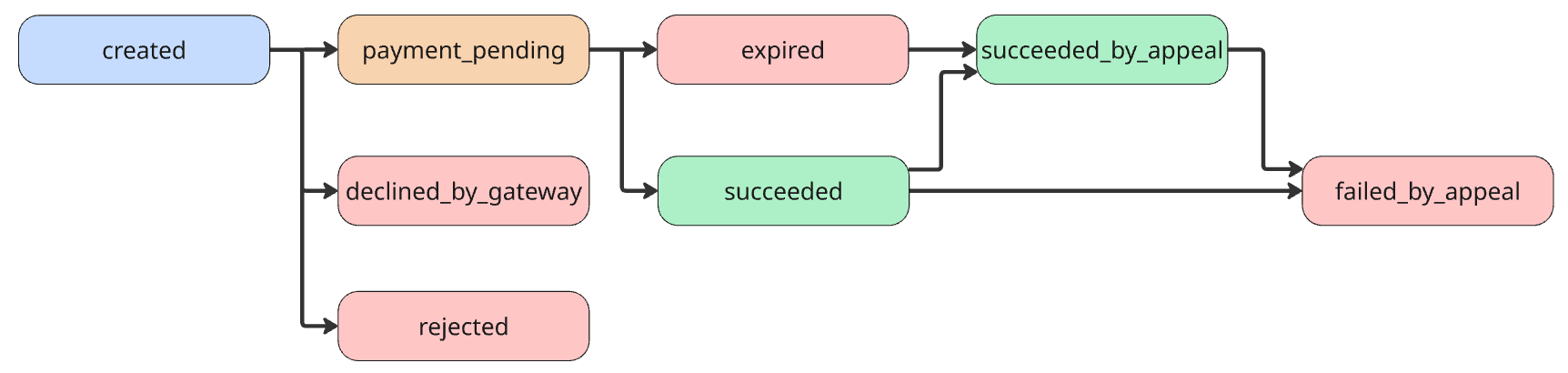
PayIn - P2P#
| Status | Description |
|---|---|
created |
Order registered in the system |
rejected |
Order rejected |
declined_by_gateway |
Failed to find a provider to process the order |
payment_pending |
Order processed. Waiting for payment from the client |
expired |
Order TTL expired, payment was not made |
succeeded |
Order successfully completed, payment was made |
succeeded_by_appeal |
Order recognized as successful by appeal |
failed_by_appeal |
Order recognized as failed by appeal |
Default TTL value — 15 minutes.
PayIn - QuasiEcom#

| Status | Description |
|---|---|
created |
Order registered in the system |
rejected |
Order rejected |
declined_by_gateway |
Failed to find a provider to process the order |
confirm_waiting |
Waiting for confirmation code |
waiting_for_terminal |
Waiting for payment processing by the provider |
failed_by_terminal |
Provider failed to process the payment |
expired |
Order TTL expired, payment was not made |
succeeded |
Order successfully completed, payment was made |
succeeded_by_appeal |
Order recognized as successful by appeal |
failed_by_appeal |
Order recognized as failed by appeal |
PayIn - Ecom#
| Status | Description |
|---|---|
created |
Order registered in the system |
rejected |
Order rejected |
declined_by_gateway |
Failed to find a provider to process the order |
submit_in_progress |
Internal: card submission to the gateway, short-lived |
confirm_waiting |
Payment created on the gateway, awaiting the result (the client completes 3-D Secure on the gateway side) |
failed_by_terminal |
Provider failed to process the payment |
expired |
Order TTL expired, payment was not made |
succeeded |
Order successfully completed, payment was made |
succeeded_by_appeal |
Order recognized as successful by appeal |
failed_by_appeal |
Order recognized as failed by appeal |
TTL value is set by the method settings.
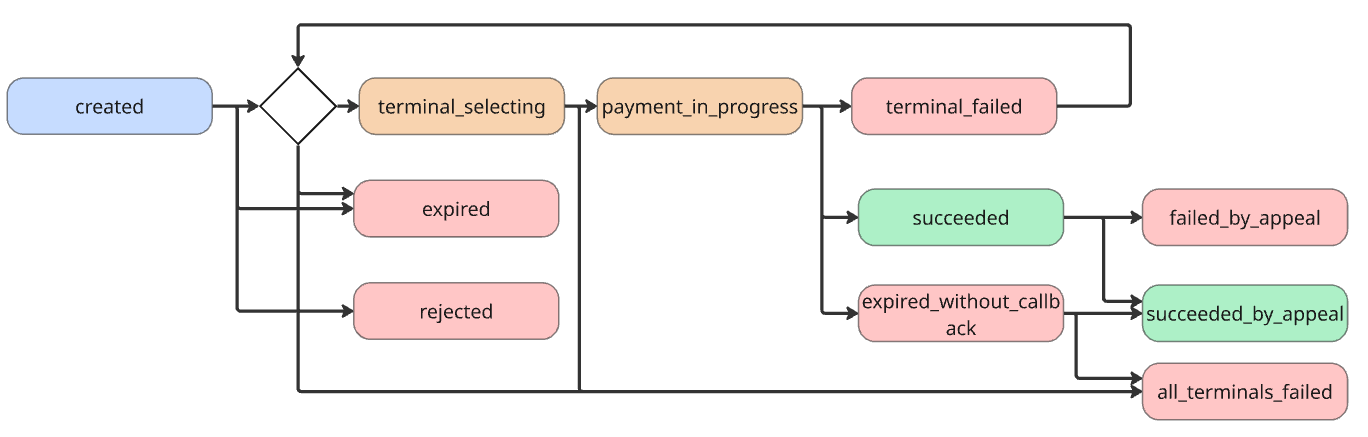
PayOut - P2P#
| Status | Description |
|---|---|
created |
Order registered in the system |
rejected |
Order rejected |
terminal_selecting |
Selecting a provider for payment |
payment_in_progress |
Provider selected. Waiting for payment from the provider |
expired |
Order TTL expired, payment was not made |
terminal_failed |
Provider failed to process the payment |
expired_without_callback |
Order TTL expired, but there is no information about payment success from provider |
succeeded |
Order successfully completed, payment was made |
succeeded_by_appeal |
Order marked as successful by appeal |
failed_by_appeal |
Payment was not made, determined by appeal |
all_terminals_failed |
Failed to find a provider for payment. Payment was not made |
TTL value is discussed during integration.
Order Model#
The unified OrderOut model is used in the order card, list, and webhook:
| Field | Type | Required | Description |
|---|---|---|---|
id |
string | yes | Order UUID |
createdAt |
string | yes | Creation date and time, RFC 3339 |
updatedAt |
string | yes | Update date and time, RFC 3339 |
type |
string | yes | Type: PayIn, PayOut, QuasiEcom, Ecom |
direction |
string | yes | Direction: PayIn or PayOut |
status |
string | yes | Status, see the status model |
merchantOrderID |
string | no | Merchant order identifier |
clientID |
string | no | Client identifier |
methodID |
integer | yes | Order method |
paymentDetails |
object | no | Payment details, see "Payment Details" |
currencyCode |
string | yes | ISO 4217 of the order currency |
amount |
float64 | yes | Amount in fiat |
merchantCommission |
float64 | no* | Merchant commission in the order currency |
amountUSDT |
float64 | no* | Order amount in USDT |
merchantCommissionUSDT |
float64 | no* | Merchant commission in USDT |
exchangeRate |
float64 | no* | Fiat -> USDT rate |
trafficType |
string | yes | Traffic type |
* - amountUSDT, merchantCommission, and merchantCommissionUSDT are present after
the order is calculated; they are absent at payment-page order creation (status
created).
* - exchangeRate is fixed by the method rate at creation and is present immediately;
it is optional in the OpenAPI schema.
Payment Details#
Payment details - where the client should pay - are returned as the paymentDetails block
in the PayIn P2P H2H creation response and in the callback body (for P2P). Block fields:
| Field | Type | Required | Description |
|---|---|---|---|
requisiteTypeCode |
string | yes | Requisite type code |
recipientName |
string | no | Requisite holder name |
recipientNumber |
string | no | Requisite value for the transfer |
recipientBank |
string | no | Requisite bank |
When paying by link, the value is passed in recipientNumber. methodID is a field of
the order itself and is not part of the block. For QuasiEcom and Ecom, the block is not returned -
the payment is made with the client's card.
Client Data#
The clientMetadata object in order creation requests (all fields are optional;
individual methods require specific fields - confirm during integration):
| Field | Type | Description |
|---|---|---|
phone |
string | Phone |
operator |
string | Operator |
name |
string | Name |
email |
string | |
otp |
string | One-time operator code |
documentType |
string | Identity document type |
documentNumber |
string | Identity document number |
streetAddress |
string | Address |
city |
string | City |
zipCode |
string | Client zip code |
API Response Structure#
The successful response body is flat JSON without the result/data envelope. A list is
returned as { items, total }, where total is the number of entities matching the
filters, ignoring pagination.
Error format, HTTP codes, and the errorCode table are on the
"Request Authorization" page.
API Data Formats#
- Time:
string, RFC 3339, e.g.2026-08-31T06:37:45.776331Z - Fiat amounts:
float64, 2 decimal places (input rounding) - USDT amounts:
float64with precision up to 6 decimal places